

zenDictionary automatically categorizes customer feedback using AI.
zenDictionary is zenloop's intelligent feedback categorization feature that automatically labels and organizes customer feedback using artificial intelligence. It applies relevant topics to incoming comments, helping you quickly identify patterns and prioritize improvements.
How zenDictionary works
AI evaluates each customer response and assigns up to 5 relevant topics. Each topic receives its own sentiment classification (positive, neutral, or negative).
The AI learns from:
Topic titles — Your primary signal. Clear, descriptive names guide classification.
Topic hierarchy — Parent-child relationships (up to 4 levels deep)
Descriptions — Context about what the topic covers
Examples — Real customer phrases that match the topic
Sentiment indicators — Keywords signaling positive, neutral, or negative feedback
Setting up your topics
Step 1: Create clear topic titles
For most topics, a descriptive title is all you need:
✅ "Lieferung & logistik" (Delivery & logistics)
✅ "Produktqualität & produkterfahrung" (Product quality & product experience)
✅ "Preis & erwartung" (Price & expectations)
✅ "Kundenservice > Reaktionszeit" (Customer service > Response time)
❌ "DL" (too abbreviated)
❌ "Misc" (too vague)
Tip: Include unique business terminology in titles. If you call your installation service "Montage ABC," use that name.
Step 2: Organize with hierarchy (optional)
Group related topics for more precise categorization:
Service (Level 1)
├── Response Time (Level 2)
│ ├── Email Response (Level 3)
│ └── Phone Response (Level 3)
└── Staff Friendliness (Level 2)
When feedback matches a child topic, parent topics are automatically included.
Format option: Use > separators in names: "Service > Response Time > Email"
⚠️ Limit: Maximum 4 hierarchy levels supported.
Step 3: Test your setup
Before adding descriptions or examples, test with real comments:
Open the "Test with comment" feature
Paste a sample customer comment
Review which topics the AI assigns
Check the sentiment detected for each topic
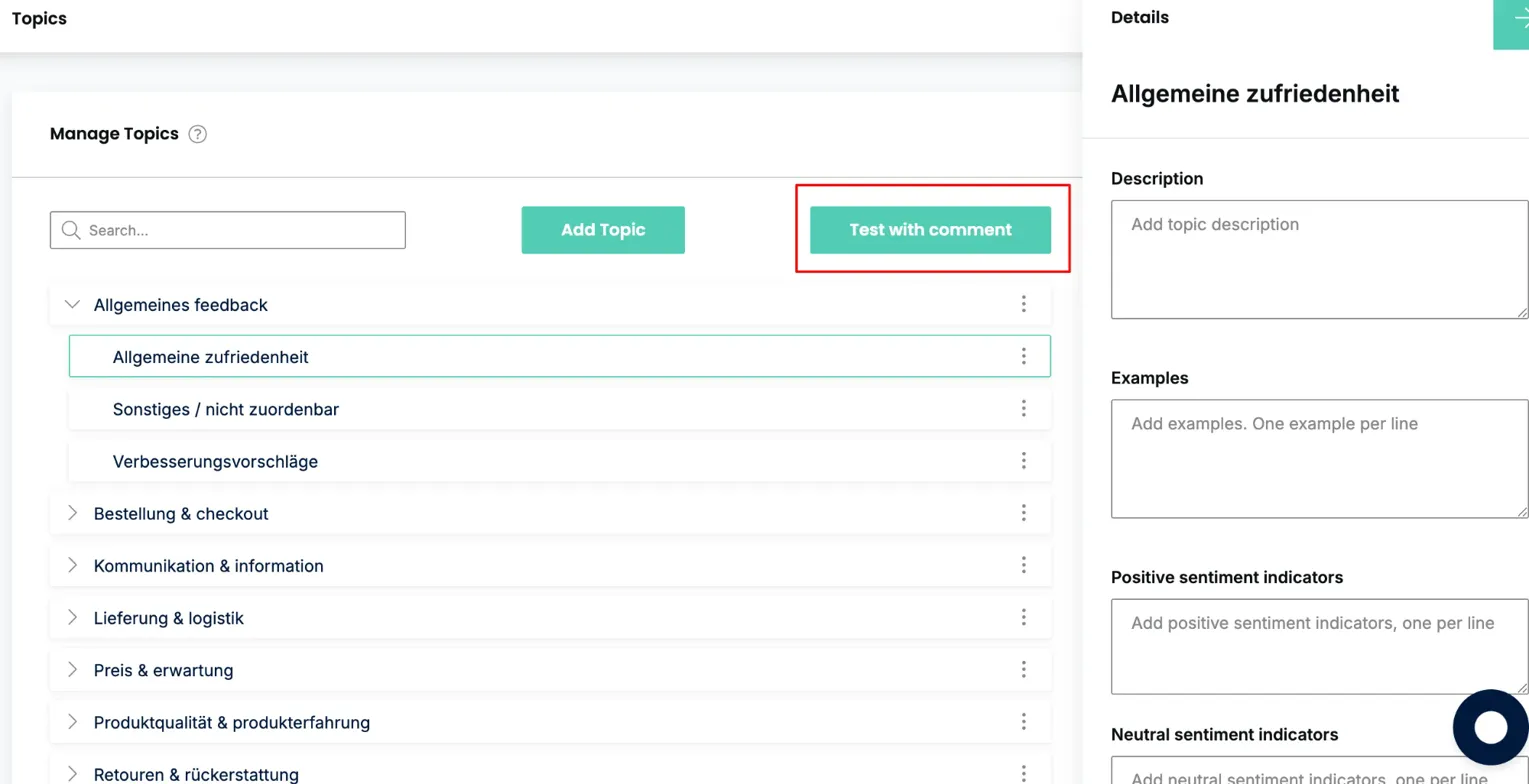
If classification is accurate, you're done. Only proceed to Step 4 if you see issues.
Step 4: Add guidance when needed
When titles alone aren't enough—typically for company-specific terminology, ambiguous topics, or specialized subject areas—enhance your topics:
Descriptions
Explain the scope and boundaries of a topic.
Topic: Montage ABC
Description: "Feedback about our solar panel installation process, including scheduling, technician visits, and installation timeline"
Examples
Your most powerful tool. Add real customer phrases (one per line):
Installation took too long
Installer was very professional
Schedule was changed last minute
Monteur war pünktlich
Pro tip: Include examples in multiple languages if customers provide multilingual feedback.
Language support
zenDictionary supports 200+ languages automatically:
Auto-detection — The AI identifies each comment's language
Translation — Comments can be translated to your target languages
Multilingual topics — Add examples in multiple languages for better matching
Supported languages include English, German, Spanish, French, Italian, Portuguese, Dutch, Polish, Japanese, Chinese, Arabic, and many more.
Best practices
Do
Start simple — Let the AI work with just titles first
Test with real comments — Verify accuracy before and after changes
Use customer language — Include phrases customers actually use, not internal jargon
Iterate gradually — Add descriptions and examples as needed, not all at once
Include multilingual examples — If you receive feedback in multiple languages
Don't
Over-complicate — Only add details when titles alone aren't sufficient
Use unexplained abbreviations — Spell them out or include both versions
Create overlapping topics — Keep boundaries clear between related categories
Skip testing — Always verify changes improve accuracy
Exceed 4 hierarchy levels — Deeper hierarchies aren't supported
Automatic detection
zenDictionary automatically flags:
Email addresses — Comments containing email addresses (may need direct follow-up)
Questions — Comments containing "?" (may need a response)
Use these flags to filter and prioritize feedback requiring action.
Need help?
If you're experiencing persistent categorization issues or need guidance on structuring your topics, reach out to the zenloop team.
💡 Remember: The AI performs best when your topic structure mirrors how customers naturally talk about their experiences. Keep it simple, use their language, and let the AI do the heavy lifting.